
Download Cocoa Packet Analyzer – Network Protocol Analyzer for macOS
Overview
Cocoa Packet Analyzer is a native macOS application built with Apple’s Cocoa framework, designed to give developers, network engineers, and security enthusiasts a reliable tool for deep packet inspection. The software operates as a full‑featured network protocol analyzer and packet sniffer, letting users capture live traffic from any selected network interface, filter results with powerful regular expressions, and store sessions in the universally‑accepted PCAP format. By enabling promiscuous mode, the analyzer can listen to every frame that traverses the local network segment, not just those addressed to the host machine, which makes it an indispensable asset for troubleshooting complex network issues or performing security audits.
The application supports a comprehensive list of protocols—including Ethernet, ARP, IPv4/IPv6, TCP, UDP, ICMP, IGMP, PPP, PPPoE, VLAN, L2TP, RADIUS, SIP, and many more—so users can dissect traffic from the data link layer up to the application layer without switching tools. Whether you need to verify a new firewall rule, diagnose latency spikes, or simply explore how a particular service communicates, Cocoa Packet Analyzer offers a clean, Mac‑centric interface that balances raw power with ease of use. Its ability to export captured data for later analysis in Wireshark or other tools ensures a flexible workflow that fits both ad‑hoc investigations and systematic network monitoring campaigns.
Key Features
- Native macOS Cocoa UI – sleek, responsive design that feels at home on any Mac.
- Live packet capture with one‑click “Start” and “Stop” controls.
- Promiscuous mode support for full‑network visibility.
- Regular‑expression based filtering for precise packet selection.
- Save and load sessions in PCAP, the industry‑standard capture format.
- Broad protocol support: Ethernet, ARP, IPv4, IPv6, TCP, UDP, ICMP, IGMP, PPP, PPPoE, VLAN (802.1Q), L2TP, RADIUS, SIP, and many others.
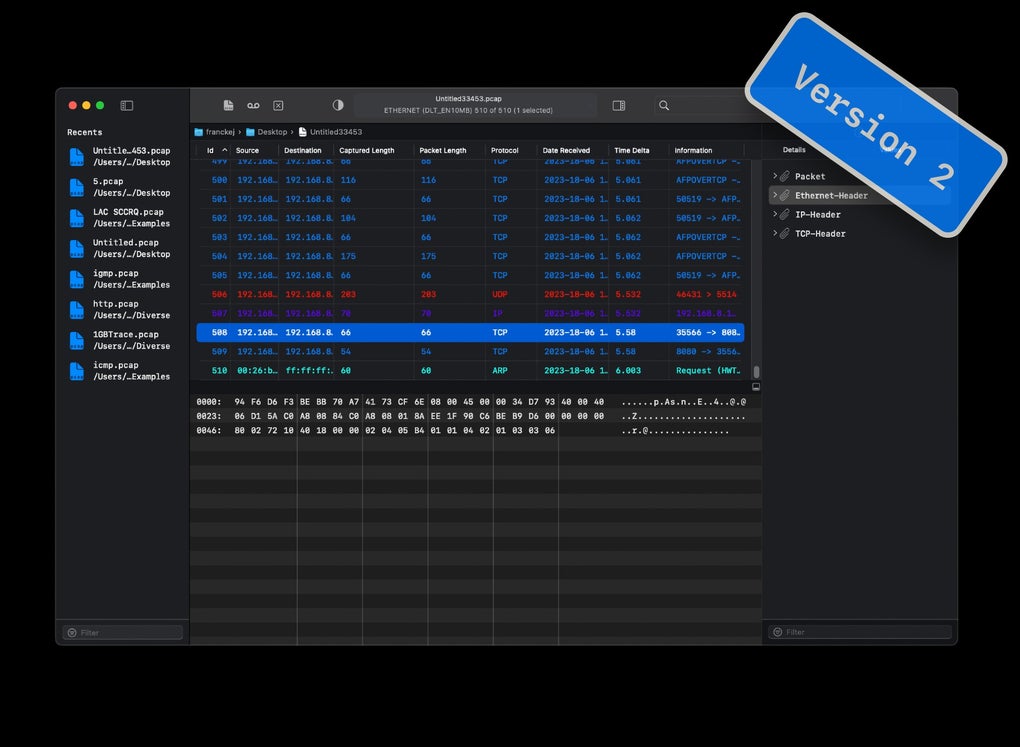
- Detailed packet breakdown view showing header fields, payload data, and checksum verification.
- Export options: CSV for statistical analysis, plain‑text logs, and direct hand‑off to Wireshark.
- Built‑in statistics panel summarizing packet counts, protocol distribution, and traffic rates.
- Lightweight footprint – runs smoothly on older Mac hardware without sacrificing performance.
Installation & Usage Instructions
Getting started with Cocoa Packet Analyzer is straightforward, even for users who are new to packet sniffing. Follow these steps to download, install, and begin capturing traffic:
- Download the installer. Visit the official website and click the “Download for macOS” button. The file is a signed
.dmgpackage, ensuring a secure and verified installation. - Mount the DMG. Double‑click the downloaded file; macOS will open a virtual disk showing the application icon and a shortcut to the Applications folder.
- Copy to Applications. Drag the Cocoa Packet Analyzer icon into the Applications folder. This step gives the app the proper permissions to run under macOS security policies.
- Launch the app. Open the application from Launchpad or Spotlight. The first launch may prompt you to allow network access; approve this request in the Security & Privacy pane.
- Select a network interface. In the main window, a dropdown lists all available interfaces (Wi‑Fi, Ethernet, Thunderbolt Bridge, etc.). Choose the one you wish to monitor.
- Enable promiscuous mode. Tick the “Promiscuous” checkbox if you need to capture traffic not addressed to your Mac. This is especially useful in switched environments or when debugging VLANs.
- Start capturing. Click the bold “Start” button. Packets will begin to appear in real time, each line showing timestamp, source/destination, protocol, and basic info.
- Apply filters. Use the filter bar at the top to type regular expressions (e.g.,
TCP.port==80orIP.src==192\.168\.1\.\d+) and instantly narrow the view to relevant traffic. - Save the session. When finished, click “Stop” then “Save”. Choose a location and the PCAP format; you can later reopen the file or load it into Wireshark for deeper analysis.
- Review statistics. Switch to the “Stats” tab to see a graphical overview of protocol distribution, packet rates, and error counts, helping you quickly spot anomalies.
The application also supports command‑line automation through a bundled cpa-cli tool, allowing scripted captures for scheduled monitoring or integration with CI pipelines. Documentation is included in the Help menu, offering examples for common use‑cases such as capturing only HTTP traffic, filtering by MAC address, or exporting summary reports.
Compatibility, Pros & Cons
Cocoa Packet Analyzer runs on macOS 10.13 (High Sierra) and later, including the current macOS Ventura and Sonoma releases. It is optimized for both Intel‑based Macs and Apple Silicon (M1/M2) devices, automatically selecting the appropriate binary for optimal performance. The app does not have Windows, Linux, Android, or iOS versions; however, captured PCAP files can be transferred to any platform for analysis with compatible tools.
Pros
- Fully native macOS experience – no reliance on Java or third‑party runtimes.
- Rich protocol support out of the box, reducing the need for additional plugins.
- Intuitive UI with real‑time filtering makes it easy to focus on the traffic that matters.
- Lightweight resource usage; it runs smoothly on older MacBooks and Mac mini units.
- Secure download and signed binary ensure a trustworthy installation.
- Export to PCAP enables seamless hand‑off to industry‑standard tools like Wireshark.
Cons
- No Windows or Linux client – users on other operating systems must rely on alternative tools.
- Lacks advanced scripting engine inside the GUI; power users must use the separate CLI for automation.
- Limited built‑in reporting – for extensive reports, data must be exported and processed elsewhere.
- Free version provides core functionality; some premium features (e.g., multi‑interface capture, advanced statistical graphs) require a paid license.
FAQ & Conclusion
Is Cocoa Packet Analyzer free or paid?
The base version of Cocoa Packet Analyzer is free and includes all essential capture and filtering features. A premium license is available for users who need advanced reporting, multi‑interface capture, and priority support.
Can I capture traffic on a Wi‑Fi network that uses WPA2 encryption?
Yes, Cocoa Packet Analyzer can capture Wi‑Fi frames on a network secured with WPA2, but you will only see encrypted payloads unless you provide the network’s decryption keys. The tool will still display header information such as MAC addresses and protocol types.
How does the app handle large capture files?
Large PCAP files are loaded on demand; the UI streams packets rather than reading the entire file into memory. This design keeps performance stable even when working with several gigabytes of data, though very large files are best analyzed in a dedicated tool like Wireshark.
Does the analyzer support IPv6 traffic?
Full IPv6 support is built in. The packet view displays source and destination IPv6 addresses, header fields, and extension headers, allowing you to troubleshoot modern networks that rely on IPv6 addressing.
Is there a command‑line version for automated captures?
Yes, the bundled cpa-cli tool lets you start, stop, and filter captures via terminal scripts. This is ideal for scheduled monitoring, CI pipelines, or remote execution over SSH.
Conclusion
Cocoa Packet Analyzer fills a niche that many macOS users have long needed: a powerful, native packet sniffer that doesn’t require a jump to Windows or Linux. Its combination of real‑time filtering, extensive protocol coverage, and seamless PCAP export makes it suitable for both quick troubleshooting and deeper forensic analysis. While the free edition already offers a robust set of features, organizations that need multi‑interface capture or advanced reporting can upgrade to the premium license for a modest fee. Whether you’re a network administrator, a security researcher, or a developer debugging API traffic, Cocoa Packet Analyzer provides a secure, reliable, and easy‑to‑use solution that integrates perfectly with the macOS ecosystem. Download it today, start capturing, and gain the visibility you need to keep your networks running smoothly.
Cocoa Packet Analyzer delivers a polished macOS experience with all the essential features of a professional network analyzer. Its intuitive UI and powerful regex filtering set it apart from generic sniffers, while the free version is generous enough for most daily tasks.
Pros: Native UI, broad protocol support, lightweight, free core version.
Cons: No Windows/Linux client, limited built‑in reporting.







